

Examples
Sync individual projects
Sync individual projects
{
    "type": "gitlab",
    "projects": [
        "my-group/foo",
        "my-group/subgroup/bar"
    ]
}
Sync all projects in a group/subgroup
Sync all projects in a group/subgroup
{
    "type": "gitlab",
    "groups": [
        "my-group",
        "my-other-group/sub-group"
    ]
}
Sync all projects in a self managed instance
Sync all projects in a self managed instance
This option is ignored if
url is unset. See connecting to a custom gitlab host.{
"type": "gitlab",
"url": "https://gitlab.example.com",
// Index all projects in this self-managed instance
"all": true
}
Sync all projects owned by a user
Sync all projects owned by a user
{
    "type": "gitlab",
    "users": [
        "user-1",
        "user-2"
    ]
}
Filter projects by topic
Filter projects by topic
{
    "type": "gitlab",
    // Sync all projects in `my-group` that have a topic that...
    "groups": [
        "my-group"
    ],
    // ...match one of these glob patterns.
    "topics": [
        "test-*",
        "ci-*",
        "k8s"
    ]
}
Exclude projects from syncing
Exclude projects from syncing
{
    "type": "gitlab",
    // Include all projects in these groups...
    "groups": [
        "my-group",
        "my-other-group/sub-group"
    ]
    // ...except:
    "exclude": {
        // projects that are archived
        "archived": true,
        // projects that are forks
        "forks": true,
        // projects that are owned by users (not groups)
        "userOwnedProjects": true,
        // projects that match these glob patterns
        "projects": [
            "my-group/foo/**",
            "my-group/bar/**",
            "my-other-group/sub-group/specific-project"
        ],
        // repos with topics that match these glob patterns
        "topics": [
            "test-*",
            "ci"
        ]
    }
}
Authenticating with GitLab
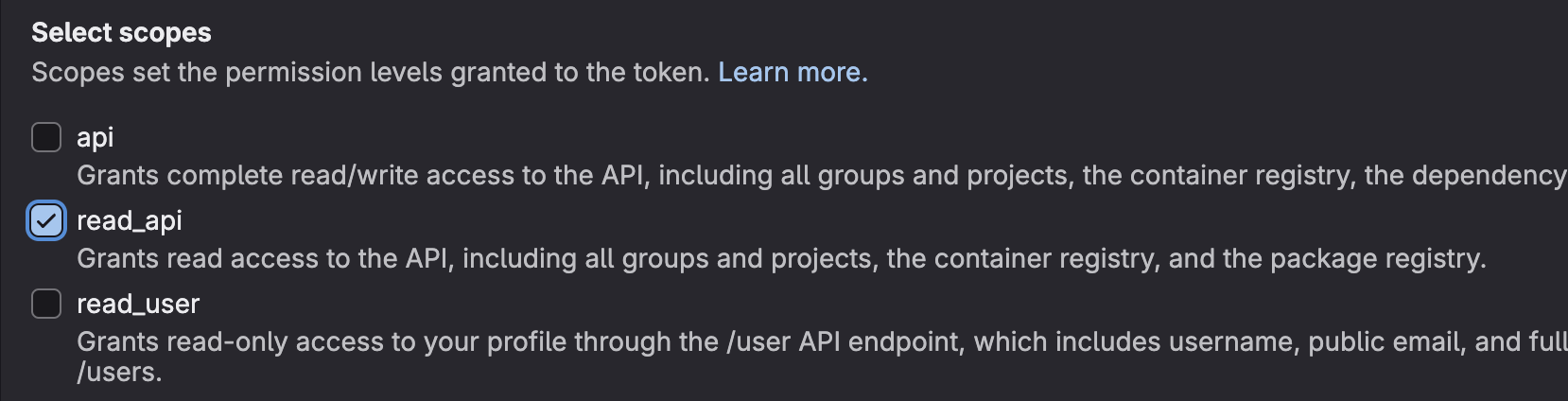
In order to index private projects, you’ll need to generate a GitLab Personal Access Token (PAT). Create a new PAT here and make sure you select theread_api scope:
token property, either as an environment variable or a secret:
- Environment Variable
- Secret
- Add the
tokenproperty to your connection config:
{
    "type": "gitlab",
    "token": {
        // note: this env var can be named anything. It
        // doesn't need to be `GITLAB_TOKEN`.
        "env": "GITLAB_TOKEN"
    }
    // .. rest of config ..
}
- Pass this environment variable each time you run Sourcebot:
    docker run \
        -e GITLAB_TOKEN=<PAT> \
        /* additional args */ \
        ghcr.io/sourcebot-dev/sourcebot:latest
Secrets are only supported when authentication is enabled.
-
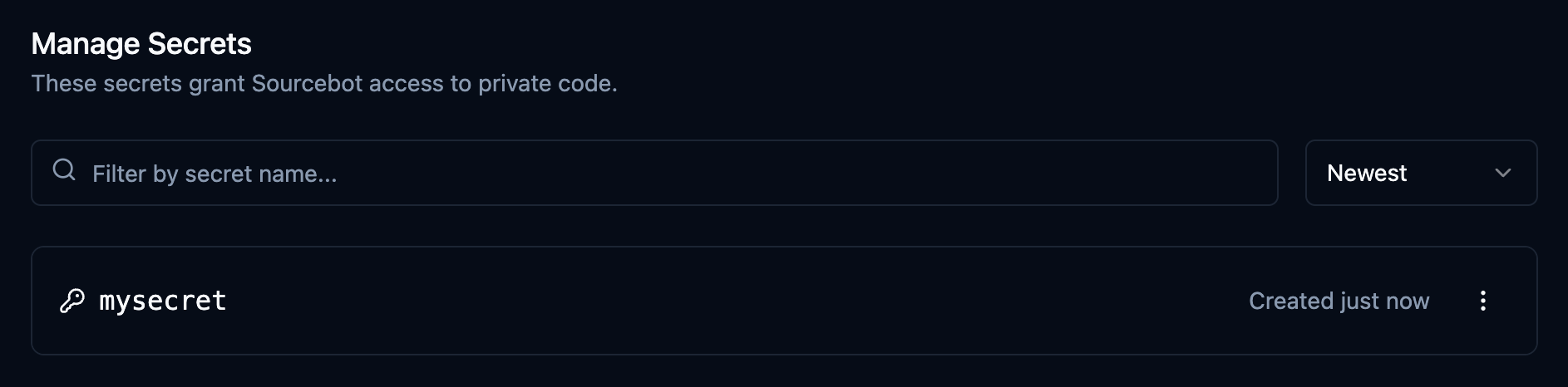
Navigate to Secrets in settings and create a new secret with your PAT:
-
Add the
tokenproperty to your connection config:
{
    "type": "gitlab",
    "token": {
        "secret": "mysecret"
    }
    // .. rest of config ..
}
Connecting to a custom GitLab host
To connect to a GitLab host other thangitlab.com, provide the url property to your config:
{
    "type": "gitlab",
    "url": "https://gitlab.example.com"
    // .. rest of config ..
}
Troubleshooting
- If you’re seeing errors like
GitbeakerTimeoutError: Query timeout was reachedwhen syncing a large number of projects, you can increase the client’s timeout by setting theGITLAB_CLIENT_QUERY_TIMEOUT_SECONDSenvironment variable. #162
Schema reference
Reference
Reference
schemas/v3/gitlab.json
{
  "$schema": "http://json-schema.org/draft-07/schema#",
  "type": "object",
  "title": "GitlabConnectionConfig",
  "properties": {
    "type": {
      "const": "gitlab",
      "description": "GitLab Configuration"
    },
    "token": {
      "description": "An authentication token.",
      "examples": [
        {
          "secret": "SECRET_KEY"
        }
      ],
      "anyOf": [
        {
          "type": "object",
          "properties": {
            "secret": {
              "type": "string",
              "description": "The name of the secret that contains the token."
            }
          },
          "required": [
            "secret"
          ],
          "additionalProperties": false
        },
        {
          "type": "object",
          "properties": {
            "env": {
              "type": "string",
              "description": "The name of the environment variable that contains the token. Only supported in declarative connection configs."
            }
          },
          "required": [
            "env"
          ],
          "additionalProperties": false
        }
      ]
    },
    "url": {
      "type": "string",
      "format": "url",
      "default": "https://gitlab.com",
      "description": "The URL of the GitLab host. Defaults to https://gitlab.com",
      "examples": [
        "https://gitlab.com",
        "https://gitlab.example.com"
      ],
      "pattern": "^https?:\\/\\/[^\\s/$.?#].[^\\s]*$"
    },
    "all": {
      "type": "boolean",
      "default": false,
      "description": "Sync all projects visible to the provided `token` (if any) in the GitLab instance. This option is ignored if `url` is either unset or set to https://gitlab.com ."
    },
    "users": {
      "type": "array",
      "items": {
        "type": "string"
      },
      "description": "List of users to sync with. All projects owned by the user and visible to the provided `token` (if any) will be synced, unless explicitly defined in the `exclude` property."
    },
    "groups": {
      "type": "array",
      "items": {
        "type": "string"
      },
      "examples": [
        [
          "my-group"
        ],
        [
          "my-group/sub-group-a",
          "my-group/sub-group-b"
        ]
      ],
      "description": "List of groups to sync with. All projects in the group (and recursive subgroups) visible to the provided `token` (if any) will be synced, unless explicitly defined in the `exclude` property. Subgroups can be specified by providing the path to the subgroup (e.g. `my-group/sub-group-a`)."
    },
    "projects": {
      "type": "array",
      "items": {
        "type": "string"
      },
      "examples": [
        [
          "my-group/my-project"
        ],
        [
          "my-group/my-sub-group/my-project"
        ]
      ],
      "description": "List of individual projects to sync with. The project's namespace must be specified. See: https://docs.gitlab.com/ee/user/namespace/"
    },
    "topics": {
      "type": "array",
      "items": {
        "type": "string"
      },
      "minItems": 1,
      "description": "List of project topics to include when syncing. Only projects that match at least one of the provided `topics` will be synced. If not specified, all projects will be synced, unless explicitly defined in the `exclude` property. Glob patterns are supported.",
      "examples": [
        [
          "docs",
          "core"
        ]
      ]
    },
    "exclude": {
      "type": "object",
      "properties": {
        "forks": {
          "type": "boolean",
          "default": false,
          "description": "Exclude forked projects from syncing."
        },
        "archived": {
          "type": "boolean",
          "default": false,
          "description": "Exclude archived projects from syncing."
        },
        "userOwnedProjects": {
          "type": "boolean",
          "default": false,
          "description": "Exclude user-owned projects from syncing."
        },
        "projects": {
          "type": "array",
          "items": {
            "type": "string"
          },
          "default": [],
          "examples": [
            [
              "my-group/my-project"
            ]
          ],
          "description": "List of projects to exclude from syncing. Glob patterns are supported. The project's namespace must be specified, see: https://docs.gitlab.com/ee/user/namespace/"
        },
        "topics": {
          "type": "array",
          "items": {
            "type": "string"
          },
          "description": "List of project topics to exclude when syncing. Projects that match one of the provided `topics` will be excluded from syncing. Glob patterns are supported.",
          "examples": [
            [
              "tests",
              "ci"
            ]
          ]
        }
      },
      "additionalProperties": false
    },
    "revisions": {
      "type": "object",
      "description": "The revisions (branches, tags) that should be included when indexing. The default branch (HEAD) is always indexed. A maximum of 64 revisions can be indexed, with any additional revisions being ignored.",
      "properties": {
        "branches": {
          "type": "array",
          "description": "List of branches to include when indexing. For a given repo, only the branches that exist on the repo's remote *and* match at least one of the provided `branches` will be indexed. The default branch (HEAD) is always indexed. Glob patterns are supported. A maximum of 64 branches can be indexed, with any additional branches being ignored.",
          "items": {
            "type": "string"
          },
          "examples": [
            [
              "main",
              "release/*"
            ],
            [
              "**"
            ]
          ],
          "default": []
        },
        "tags": {
          "type": "array",
          "description": "List of tags to include when indexing. For a given repo, only the tags that exist on the repo's remote *and* match at least one of the provided `tags` will be indexed. Glob patterns are supported. A maximum of 64 tags can be indexed, with any additional tags being ignored.",
          "items": {
            "type": "string"
          },
          "examples": [
            [
              "latest",
              "v2.*.*"
            ],
            [
              "**"
            ]
          ],
          "default": []
        }
      },
      "additionalProperties": false
    }
  },
  "required": [
    "type"
  ],
  "additionalProperties": false
}