> ## Documentation Index
> Fetch the complete documentation index at: https://sourcebot-msukkarieh-ado.mintlify.site/llms.txt
> Use this file to discover all available pages before exploring further.
# Linking code from Bitbucket Cloud
Looking for docs on Bitbucket Data Center? See [this doc](/docs/connections/bitbucket-data-center).
If you're not familiar with Sourcebot [connections](/docs/connections/overview), please read that overview first.
## Examples
```json
{
"type": "bitbucket",
"deploymentType": "cloud",
"repos": [
"myWorkspace/myRepo"
]
}
```
```json
{
"type": "bitbucket",
"deploymentType": "cloud",
"workspaces": [
"myWorkspace"
]
}
```
```json
{
"type": "bitbucket",
"deploymentType": "cloud",
"projects": [
"myProject"
]
}
```
```json
{
"type": "bitbucket",
"deploymentType": "cloud",
// Include all repos in my-workspace...
"workspaces": [
"myWorkspace"
],
// ...except:
"exclude": {
// repos that are archived
"archived": true,
// repos that are forks
"forks": true,
// repos that match these glob patterns
"repos": [
"myWorkspace/repo1",
"myWorkspace2/*"
]
}
}
```
## Authenticating with Bitbucket Cloud
In order to index private repositories, you'll need to provide authentication credentials. You can do this using an `App Password` or an `Access Token`
Navigate to the [app password creation page](https://bitbucket.org/account/settings/app-passwords/) and create an app password. Ensure that it has the proper permissions for the scope
of info you want to fetch (i.e. workspace, project, and/or repo level)
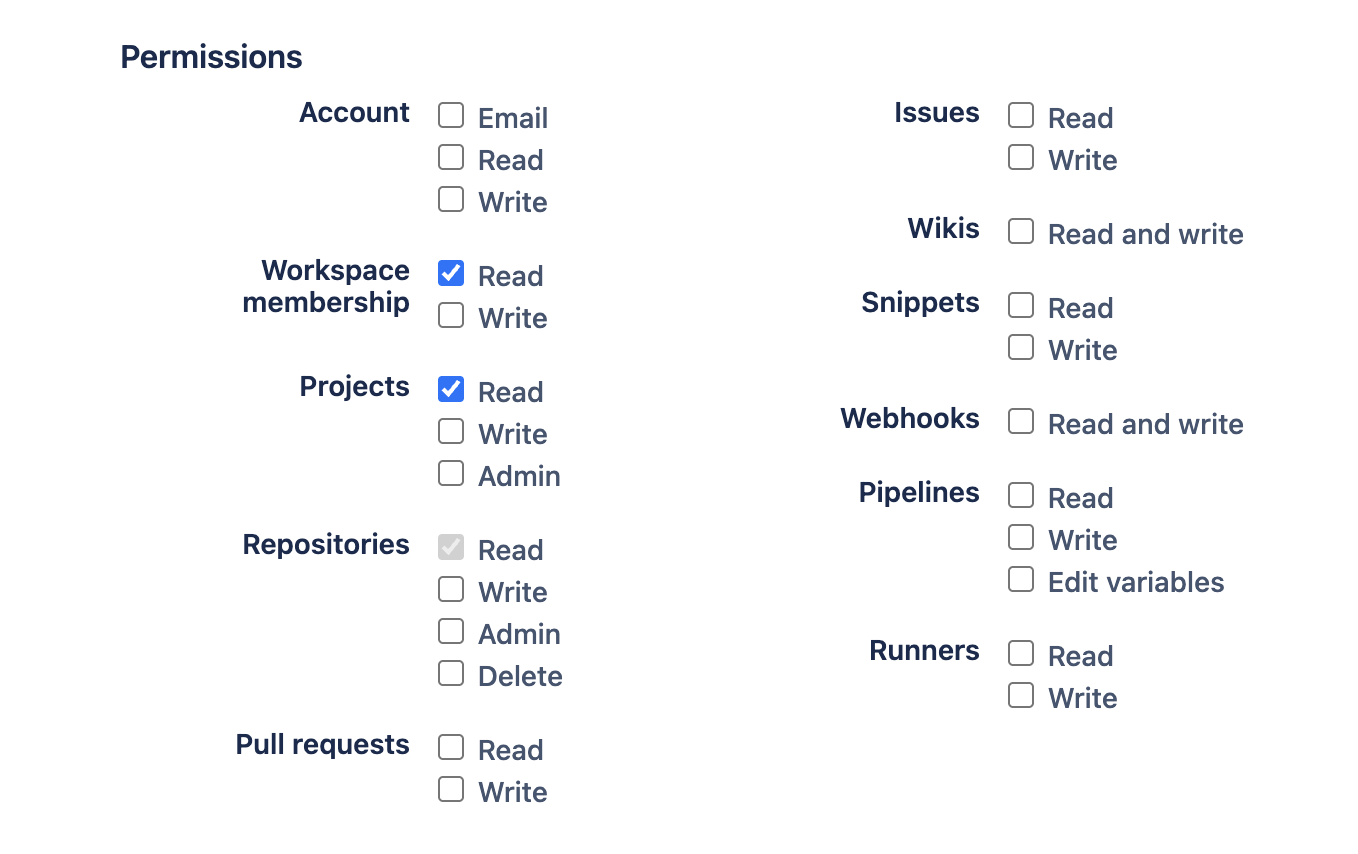 Next, provide your username + app password pair to Sourcebot:
1. Add the `token` and `user` (username associated with the app password you created) properties to your connection config:
```json
{
"type": "bitbucket",
"deploymentType": "cloud",
"user": "myusername",
"token": {
// note: this env var can be named anything. It
// doesn't need to be `BITBUCKET_TOKEN`.
"env": "BITBUCKET_TOKEN"
}
// .. rest of config ..
}
```
2. Pass this environment variable each time you run Sourcebot:
```bash
docker run \
-e BITBUCKET_TOKEN= \
/* additional args */ \
ghcr.io/sourcebot-dev/sourcebot:latest
```
Secrets are only supported when [authentication](/docs/configuration/auth/overview) is enabled.
1. Navigate to **Secrets** in settings and create a new secret with your access token:
Next, provide your username + app password pair to Sourcebot:
1. Add the `token` and `user` (username associated with the app password you created) properties to your connection config:
```json
{
"type": "bitbucket",
"deploymentType": "cloud",
"user": "myusername",
"token": {
// note: this env var can be named anything. It
// doesn't need to be `BITBUCKET_TOKEN`.
"env": "BITBUCKET_TOKEN"
}
// .. rest of config ..
}
```
2. Pass this environment variable each time you run Sourcebot:
```bash
docker run \
-e BITBUCKET_TOKEN= \
/* additional args */ \
ghcr.io/sourcebot-dev/sourcebot:latest
```
Secrets are only supported when [authentication](/docs/configuration/auth/overview) is enabled.
1. Navigate to **Secrets** in settings and create a new secret with your access token:
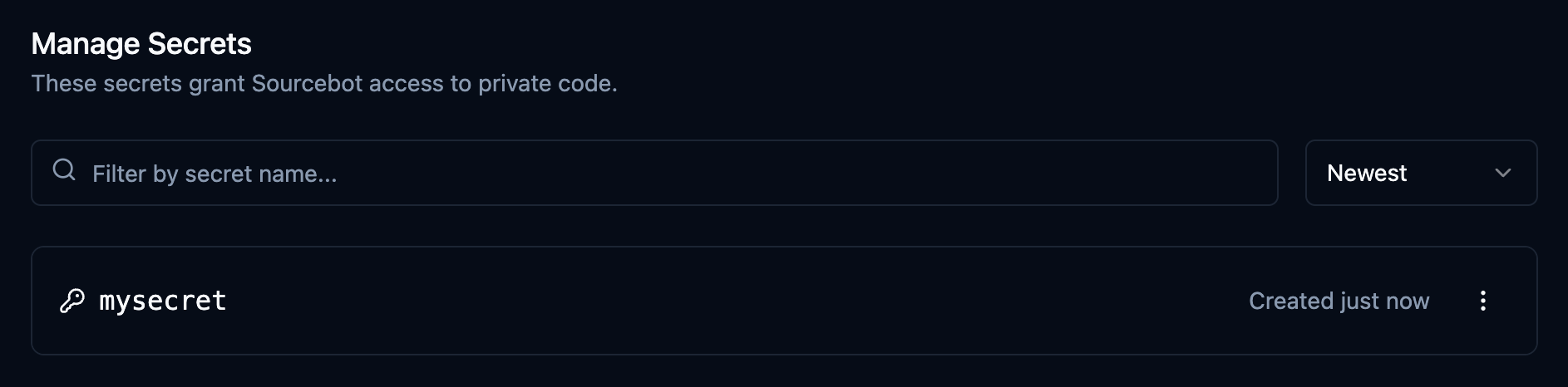 2. Add the `token` and `user` (username associated with the app password you created) properties to your connection config:
```json
{
"type": "bitbucket",
"deploymentType": "cloud",
"user": "myusername",
"token": {
"secret": "mysecret"
}
// .. rest of config ..
}
```
Create an access token for the desired scope (repo, project, or workspace). Visit the official [Bitbucket Cloud docs](https://support.atlassian.com/bitbucket-cloud/docs/access-tokens/)
for more info.
Next, provide the access token to Sourcebot:
1. Add the `token` property to your connection config:
```json
{
"type": "bitbucket",
"token": {
// note: this env var can be named anything. It
// doesn't need to be `BITBUCKET_TOKEN`.
"env": "BITBUCKET_TOKEN"
}
// .. rest of config ..
}
```
2. Pass this environment variable each time you run Sourcebot:
```bash
docker run \
-e BITBUCKET_TOKEN= \
/* additional args */ \
ghcr.io/sourcebot-dev/sourcebot:latest
```
Secrets are only supported when [authentication](/docs/configuration/auth/overview) is enabled.
1. Navigate to **Secrets** in settings and create a new secret with your PAT:
2. Add the `token` property to your connection config:
```json
{
"type": "bitbucket",
"token": {
"secret": "mysecret"
}
// .. rest of config ..
}
```
## Schema reference
[schemas/v3/bitbucket.json](https://github.com/sourcebot-dev/sourcebot/blob/main/schemas/v3/bitbucket.json)
{/* THIS IS A AUTO-GENERATED FILE. DO NOT MODIFY MANUALLY! */}
```json
{
"$schema": "http://json-schema.org/draft-07/schema#",
"type": "object",
"title": "BitbucketConnectionConfig",
"properties": {
"type": {
"const": "bitbucket",
"description": "Bitbucket configuration"
},
"user": {
"type": "string",
"description": "The username to use for authentication. Only needed if token is an app password."
},
"token": {
"description": "An authentication token.",
"examples": [
{
"secret": "SECRET_KEY"
}
],
"anyOf": [
{
"type": "object",
"properties": {
"secret": {
"type": "string",
"description": "The name of the secret that contains the token."
}
},
"required": [
"secret"
],
"additionalProperties": false
},
{
"type": "object",
"properties": {
"env": {
"type": "string",
"description": "The name of the environment variable that contains the token. Only supported in declarative connection configs."
}
},
"required": [
"env"
],
"additionalProperties": false
}
]
},
"url": {
"type": "string",
"format": "url",
"default": "https://api.bitbucket.org/2.0",
"description": "Bitbucket URL",
"examples": [
"https://bitbucket.example.com"
],
"pattern": "^https?:\\/\\/[^\\s/$.?#].[^\\s]*$"
},
"deploymentType": {
"type": "string",
"enum": [
"cloud",
"server"
],
"default": "cloud",
"description": "The type of Bitbucket deployment"
},
"workspaces": {
"type": "array",
"items": {
"type": "string"
},
"description": "List of workspaces to sync. Ignored if deploymentType is server."
},
"projects": {
"type": "array",
"items": {
"type": "string"
},
"description": "List of projects to sync"
},
"repos": {
"type": "array",
"items": {
"type": "string"
},
"description": "List of repos to sync"
},
"exclude": {
"type": "object",
"properties": {
"archived": {
"type": "boolean",
"default": false,
"description": "Exclude archived repositories from syncing."
},
"forks": {
"type": "boolean",
"default": false,
"description": "Exclude forked repositories from syncing."
},
"repos": {
"type": "array",
"items": {
"type": "string"
},
"examples": [
[
"cloud_workspace/repo1",
"server_project/repo2"
]
],
"description": "List of specific repos to exclude from syncing."
}
},
"additionalProperties": false
},
"revisions": {
"type": "object",
"description": "The revisions (branches, tags) that should be included when indexing. The default branch (HEAD) is always indexed. A maximum of 64 revisions can be indexed, with any additional revisions being ignored.",
"properties": {
"branches": {
"type": "array",
"description": "List of branches to include when indexing. For a given repo, only the branches that exist on the repo's remote *and* match at least one of the provided `branches` will be indexed. The default branch (HEAD) is always indexed. Glob patterns are supported. A maximum of 64 branches can be indexed, with any additional branches being ignored.",
"items": {
"type": "string"
},
"examples": [
[
"main",
"release/*"
],
[
"**"
]
],
"default": []
},
"tags": {
"type": "array",
"description": "List of tags to include when indexing. For a given repo, only the tags that exist on the repo's remote *and* match at least one of the provided `tags` will be indexed. Glob patterns are supported. A maximum of 64 tags can be indexed, with any additional tags being ignored.",
"items": {
"type": "string"
},
"examples": [
[
"latest",
"v2.*.*"
],
[
"**"
]
],
"default": []
}
},
"additionalProperties": false
}
},
"required": [
"type"
],
"if": {
"properties": {
"deploymentType": {
"const": "server"
}
}
},
"then": {
"required": [
"url"
]
},
"additionalProperties": false
}
```
2. Add the `token` and `user` (username associated with the app password you created) properties to your connection config:
```json
{
"type": "bitbucket",
"deploymentType": "cloud",
"user": "myusername",
"token": {
"secret": "mysecret"
}
// .. rest of config ..
}
```
Create an access token for the desired scope (repo, project, or workspace). Visit the official [Bitbucket Cloud docs](https://support.atlassian.com/bitbucket-cloud/docs/access-tokens/)
for more info.
Next, provide the access token to Sourcebot:
1. Add the `token` property to your connection config:
```json
{
"type": "bitbucket",
"token": {
// note: this env var can be named anything. It
// doesn't need to be `BITBUCKET_TOKEN`.
"env": "BITBUCKET_TOKEN"
}
// .. rest of config ..
}
```
2. Pass this environment variable each time you run Sourcebot:
```bash
docker run \
-e BITBUCKET_TOKEN= \
/* additional args */ \
ghcr.io/sourcebot-dev/sourcebot:latest
```
Secrets are only supported when [authentication](/docs/configuration/auth/overview) is enabled.
1. Navigate to **Secrets** in settings and create a new secret with your PAT:
2. Add the `token` property to your connection config:
```json
{
"type": "bitbucket",
"token": {
"secret": "mysecret"
}
// .. rest of config ..
}
```
## Schema reference
[schemas/v3/bitbucket.json](https://github.com/sourcebot-dev/sourcebot/blob/main/schemas/v3/bitbucket.json)
{/* THIS IS A AUTO-GENERATED FILE. DO NOT MODIFY MANUALLY! */}
```json
{
"$schema": "http://json-schema.org/draft-07/schema#",
"type": "object",
"title": "BitbucketConnectionConfig",
"properties": {
"type": {
"const": "bitbucket",
"description": "Bitbucket configuration"
},
"user": {
"type": "string",
"description": "The username to use for authentication. Only needed if token is an app password."
},
"token": {
"description": "An authentication token.",
"examples": [
{
"secret": "SECRET_KEY"
}
],
"anyOf": [
{
"type": "object",
"properties": {
"secret": {
"type": "string",
"description": "The name of the secret that contains the token."
}
},
"required": [
"secret"
],
"additionalProperties": false
},
{
"type": "object",
"properties": {
"env": {
"type": "string",
"description": "The name of the environment variable that contains the token. Only supported in declarative connection configs."
}
},
"required": [
"env"
],
"additionalProperties": false
}
]
},
"url": {
"type": "string",
"format": "url",
"default": "https://api.bitbucket.org/2.0",
"description": "Bitbucket URL",
"examples": [
"https://bitbucket.example.com"
],
"pattern": "^https?:\\/\\/[^\\s/$.?#].[^\\s]*$"
},
"deploymentType": {
"type": "string",
"enum": [
"cloud",
"server"
],
"default": "cloud",
"description": "The type of Bitbucket deployment"
},
"workspaces": {
"type": "array",
"items": {
"type": "string"
},
"description": "List of workspaces to sync. Ignored if deploymentType is server."
},
"projects": {
"type": "array",
"items": {
"type": "string"
},
"description": "List of projects to sync"
},
"repos": {
"type": "array",
"items": {
"type": "string"
},
"description": "List of repos to sync"
},
"exclude": {
"type": "object",
"properties": {
"archived": {
"type": "boolean",
"default": false,
"description": "Exclude archived repositories from syncing."
},
"forks": {
"type": "boolean",
"default": false,
"description": "Exclude forked repositories from syncing."
},
"repos": {
"type": "array",
"items": {
"type": "string"
},
"examples": [
[
"cloud_workspace/repo1",
"server_project/repo2"
]
],
"description": "List of specific repos to exclude from syncing."
}
},
"additionalProperties": false
},
"revisions": {
"type": "object",
"description": "The revisions (branches, tags) that should be included when indexing. The default branch (HEAD) is always indexed. A maximum of 64 revisions can be indexed, with any additional revisions being ignored.",
"properties": {
"branches": {
"type": "array",
"description": "List of branches to include when indexing. For a given repo, only the branches that exist on the repo's remote *and* match at least one of the provided `branches` will be indexed. The default branch (HEAD) is always indexed. Glob patterns are supported. A maximum of 64 branches can be indexed, with any additional branches being ignored.",
"items": {
"type": "string"
},
"examples": [
[
"main",
"release/*"
],
[
"**"
]
],
"default": []
},
"tags": {
"type": "array",
"description": "List of tags to include when indexing. For a given repo, only the tags that exist on the repo's remote *and* match at least one of the provided `tags` will be indexed. Glob patterns are supported. A maximum of 64 tags can be indexed, with any additional tags being ignored.",
"items": {
"type": "string"
},
"examples": [
[
"latest",
"v2.*.*"
],
[
"**"
]
],
"default": []
}
},
"additionalProperties": false
}
},
"required": [
"type"
],
"if": {
"properties": {
"deploymentType": {
"const": "server"
}
}
},
"then": {
"required": [
"url"
]
},
"additionalProperties": false
}
```